Using Google Drive? If you are, synchronize your Google Drive folders with your PC, Mac, Android, iPhone or iPad to conveniently access & manage Google Drive!
If you are not already using a cloud to store your files, there are several reasons you should be and want to be using a cloud... a couple that immediately comes to mind:
- Never lose anything in the event that your hard-drive crashes.
- Secure.
- Can share a folder or file with individual people or groups of people.
- Easy, fast access to your files from virtually anywhere.
- Can merge your PC folders for easy access directly from your folder manager.
I first started using Dropbox in 2010 @ $9.99/mo. for 1.02 TB. (I only recently went over 100 GB.) The main reason I continued to use Dropbox and did not do more with Google Drive was that I didn't merge my Google Drive Folders with my PC. (It is March, 2021... I use Dropbox for everything).
Now it is so much easier to access & manage your Google Drive folders than having to log in to Drive and then search, find, open, share. move, etc.
And there are dozens of other benefits to using Google Drive as your Cloud!
Much like Microsoft® Office, with Google Drive you get very similar tools... but they are free!
Google Drive is the same price as Dropbox, 1.02 TB for $9.99/mo. You get 15 Gigs storage for free, (which is a ton for the average person). But unlike 'just' a cloud to save and share your folders and files, you have access to so much more!
Google Docs is much like Word, Google Sheets are alike to excel spreadsheets, Google Slides is very similar to PowerPoint, Google Forms allows you to create forms you can embed on your website or even on Google+. Google Drawings & My Google Maps are pretty cool as well.
Read all about Google Drive Features from https://www.google.com/docs/about.
So.. if you missed where you could merge your Google Drive Folders on your PC or Mac, like me… I bring you the following!
How to Merge/Sync Your Google Drive Folders with Your PC or Mac Folders
 Go to https://tools.google.com/dlpage/drive and choose your version to download and follow the instructions. It shouldn't take any more than 2 minutes.
- Enter your Gmail that you use Drive with.
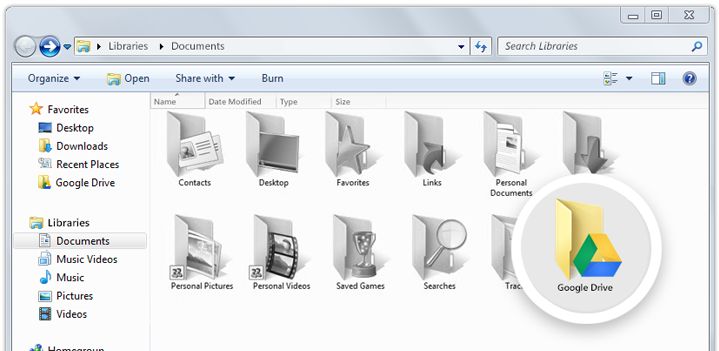
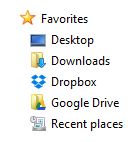
- Done. Now in your folders, you will see a Google Drive Folder. You can move it to your favorites like the image.
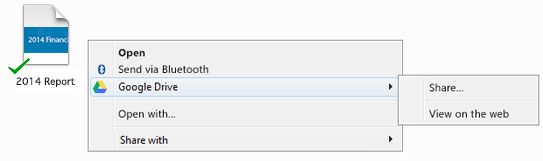
You can also share/unshare directly from your folders/files... right click on the folder and discover even more cool functions.
To your success!
 About the Author:
The SEO-Alien is a project started in 2009 regarding all things online marketing. The site started out more of a diary of predictions, suggestions and references to things I frequently used for online marketing... before social media marketing was even an option.
I hope you find the information and tools presented here useful and something worth sharing with others.
If there is anything else about online marketing or any online advertising strategy you think would be helpful, please let me know.



Online Marketing Tools and Partner Offers