One of the most common errors when creating a WordPress page is not correctly using the Permalink feature.
One of the reasons why WordPress is so powerful for the search engines is you have the ability to create what is called a "Pretty Permalink".
A Permalink is simply the URL that is displayed and read by the search engines that link to your individual blog posts.
When creating Permalinks for WordPress you will discover that there are a variety of different kinds of Permalinks that you can create. Here is the way we suggest you set-up your permalinks in WordPress to give your blog posts the best opportunity to reach the top of the Search Engines.
Why Create Pretty Permalinks?
A "Pretty Permalink" gives your blogpost much more "SEO Juice" simply because the words in the URL can now be sensitive to the search engines. It is much more powerful to have an article URL read rather than an ambiguous name like https://www.yoursite.com/?p=2986 because the name within your URL is indexed by the search engines.
By default, the Permalinks in WordPress Blog are set to display what is called a "Ugly Permalink", i.e. https://example.com/?p=123.
To get the most "SEO Juice" from your blog articles, you would want to change that to look like , also known as a "Pretty Permalink".
Creating your URL structure this way will ensure that when you title your article, the title you use becomes "Search Engine sensitive" by becoming part of your URL and when anyone is doing a search for a subject like yours, there is a much better chance for your article to be nearer the top of the SERP (Search Engine Results Page).
Creating a Pretty Permalink
Changing the default settings to create a "Pretty Permalink" in WordPress is very easy. From the Admin section of your WordPress Page, do the following:
- Locate "Settings" near the bottom left hand side of your page.
- Locate and click "Permalinks"
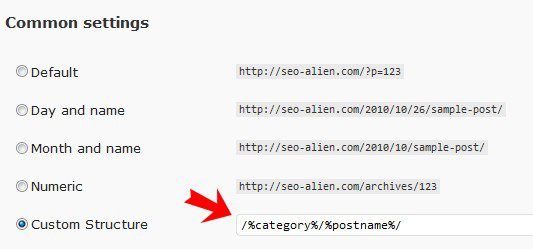
- Change the default settings to "Custom Structure"
- Add "/%category%/%postname%/" exactly as it is within the quotations (see image below)
- Click "Save Changes"
 |
When you are initially setting up your WordPress site, be sure to create a couple "Categories" that are relative to the articles your are posting. Then when you add your latest post, be sure it is added to the appropriate Category.
Take your time and do some research when choosing your articles title. This way you can be sure that your article will be Search Engine sensitive!

About the Author:
Launched in 2009, SEO-Alien began as a hands-on digital playground—a living archive of marketing predictions, strategic insights, and curated references for tools I relied on daily to drive organic growth. This was a time when content strategy and search optimization were the primary lifelines for digital visibility, long before social media marketing matured into a mainstream channel. Over the years, that foundational "diary" has evolved into an authoritative, tactical resource for advanced WordPress optimization, topical authority mapping, and enterprise-grade search engine marketing strategies.



Online Marketing Tools and Partner Offers