So you want to add your Facebook Fan page feed to your Twitter account?
Technically, Facebook has blocked that from happening, however, read on and we will share with you a work around.
This is something like what you will get when you try to access your Facebook feed:
"We're sorry, access has been blocked by the site owner via robots.txt."

So it is obvious, for whatever reason (privacy issues or Facebook and Twitter are fighting), the bottom line is using any application that used to work, now doesn't. So what do you do?
There are a few steps involved, but if you really want your Facebook Fan Page posts to post to Twitter, here are the steps.
1) Locate your Facebook Fan Page id
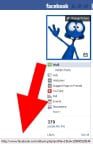 Locate your Facebook id by placing your mouse over your image on your Facebook Fan Page. When you do you will see your url in the bottom of your browser. The URL will look something like this: the "x;s' will be your facebook id that you will need to remember, so write them down.
2) Create your Feed URL
Create the complete URL of your Facebook page feed by merging your id at the end of this code. xxxxxxxxxxxx (again, the "x;s' will be your facebook id #)
Now you have created your feed URL.
3) Add your Facebook Feed to Twitterfeed
You can run that feed straight into twitterfeed or you can run it first into feedburner (which is what we recommend).
Then set your twitterfeed to post using bit.ly. Yes you will need to get an API Key for bit.ly and you can do that from https://bit.ly/ (if you already have one you can access your API username by following the instructions below.
- Click the profile menu.
- Click Profile Settings.
- Click Generic Access Token.
- Enter your Bitly account password.
- Click Generate Token.
- Click Copy to copy the token. ...
- You can now paste the token into your code or settings to connect via the API.
Now your Facebook Posts go to Twitter
At this time (and we all know things change fast), this is the only way we know of to post to from facebook to twitter.
If anyone else has found another work around, please share it with us!
Happy Feeding!
 About the Author:
The SEO-Alien is a project started in 2009 regarding all things online marketing. The site started out more of a diary of predictions, suggestions and references to things I frequently used for online marketing... before social media marketing was even an option.
I hope you find the information and tools presented here useful and something worth sharing with others.
If there is anything else about online marketing or any online advertising strategy you think would be helpful, please let me know.



Online Marketing Tools and Partner Offers




















Hi, that info above is now outdated, facebook pulled that feed about 6 months ago, here's a Facebook app that does it automatically, e.g posts your status updates and photo's etc to your twitter account, automatically http://apps.facebook.com/fbtotweet/
The new design of your website is great!, easy to use and very informative. You guys are awesome!
Thanks Pete!