
Looking for a way to add some personality to your Galaxy Watch 4 Classic? Check out the Google Play Store for watch faces! With their simple and easy-to-use interface, you can find watch faces that will suit your style.
Whether you're looking for something fun and playful or sleek and professional, they've got you covered.

Made with DesignCap
Transform Your Samsung Galaxy Watch 4 Classic with Exciting New Google Watch Faces
Enjoy your newfound freedom of expression and customization with the help of Google Watch Faces on your Samsung Galaxy Watch 4 Classic! Have fun exploring all the different watch faces that are available and find one that best suits your needs and style. With their easy-to-use interface and simple installation steps, you can have your watch face up and running in no time!
So, now you may be wondering how to install Google Watch Faces on a Samsung Galaxy 4 Classic watch? Don't fret! It's actually quite straightforward. Below are the simple steps for setting up your new watch faces in no time.
1. On your Samsung Galaxy Watch 4 Classic, open the Google Play Store app. (Swipe up on your watch Screen and tap the Google Play Store logo).
2. Search for ‘Watch Faces’ in the search bar and click on it.
3. Select the watch face you wish to download and tap on Install.
4. Once installed, press 'Set as Default' to make the watch face your current watch face.
5. Now, enjoy your customized Samsung Galaxy Watch 4 Classic with the new Google Watch Faces!
Popular Watch Faces from Google Play Store
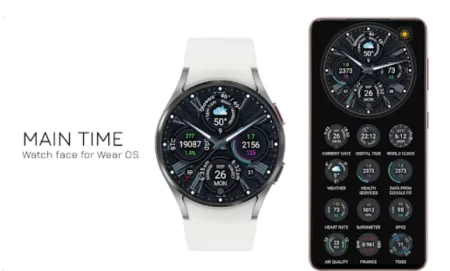
Google Watch Faces - Main Time
One of the more popular watch faces from Play Store is the "Main Time" watch face. It is a very simple and minimalistic design that displays the time and has two battery indicators. This watch face is great for those who like to keep it subtle yet stylish!
You can also customize this cool watch face by adding more information such as the weather forecast, step counter, phone and watch battery indicator and more!
- Get Up to Date Information with the Main Time Watch Face: Weather Forecast, Step Counter, Phone and Watch Battery Indicator and More!
- Enjoy Simple yet Stylish Design with the Main Time watch face
Make sure your phone has the Galaxy Wearable App installed and then you can start customizing your watch new Face!
Other Popular Galaxy 4 Classic Watch Faces from Google Play Store
Searching for other unique watch face styles? Look no further than the these top rated Google Watch faces available for the Samsung Galaxy Watch 4 Classic.
-
- Neon Glow & Circuit Board Watch Face
- Pixel Minimal Watch Face
- Sporty Minimalism Watch Face
- Diesel On Full Guard 2.5 Watch Face
- Fresh Watch Face
- PhotoWear Classic Watch Face
So go ahead and give your Samsung Galaxy Watch 4 Classic a new look! Transform it with Google Watch Faces today. Enjoy!
 About the Author:
The SEO-Alien is a project started in 2009 regarding all things online marketing. The site started out more of a diary of predictions, suggestions and references to things I frequently used for online marketing... before social media marketing was even an option.
I hope you find the information and tools presented here useful and something worth sharing with others.
If there is anything else about online marketing or any online advertising strategy you think would be helpful, please let me know.